Saturday, August 3, 2019
PASS.ORG–MS Renews #SQLSat Sponsorship and More…
The other information worth noting is changes in the By-Laws to get more experienced members on the board. Andy Warren has a good blog post to get you thinking about this change.
With all changes, there are some questions. But, over the years, you can see that some changes stick and some do not. That is what I like about the PASS structure, things get voted in and others voted out.
Please register and attend the PASS Summit this year. There are discount codes from Virtual Groups and Local User Groups
Sunday, February 3, 2019
SQLServerCentral SSAS Tabular Series: 5th Article Cleaning Up Dimensions

Enjoy!!!
Tuesday, November 20, 2018
Power BI World Tour–Dallas Nov 27-29
Please join the Power BI User Community in Dallas on Nov 27th through the 29th for the Power BI World Tour. There will be a one-day workshop on Tuesday and then regular sessions on Wednesday and Thursday.

I am planning to be there and will be presenting on Data Modeling and Intro to DAX. I am really excited to see Adam Sexton and Meagan Longria presenting. They are both great Power BI pros that do an expert job. Amanda Cofsky will be there. I always read her monthly Micrsoft Program Manager updates for Power BI. And from Baton Rouge, my friend Andy Parkenson is presenting as well.
Hope to see you there. If not, Look for upcoming events in Tampa and Chicago in 2019.
Tuesday, September 18, 2018
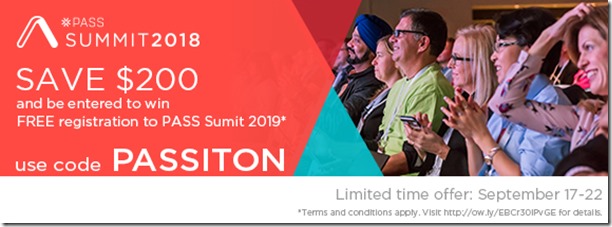
PASSITON discount code for PASS Summit 2018
This week only PASS has a new discount code of PASSITON for an additional $200 off 3-day registration. This is in addition to registration going up next by $200 gives $400 off if registered by Friday.
Also, everyone who registers by Friday will be entered into a daily prize draw for Summit 2018 merchandise including ball caps, shirts, socks and the chance at our grand prize of a pass to Summit 2019. Please read contest rules at pass.org.
https://www.pass.org/summit/2018/RegisterNow.aspx
Saturday, September 8, 2018
PASS Summit 2018 – Scheduled Released
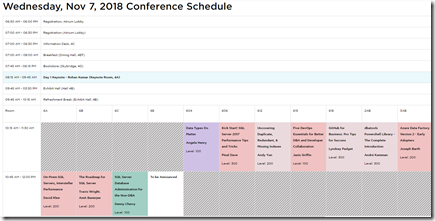
The “full” PASS Summit 2018 schedule has been released. This includes the regular sessions along with the pre-conference sessions which were released a couple of months ago.
Wednesday thru Friday are 75 minutes, 3 hour and Lighting Rounds (4 15 minute sessions). The options available for going to PASS Summit are nice.
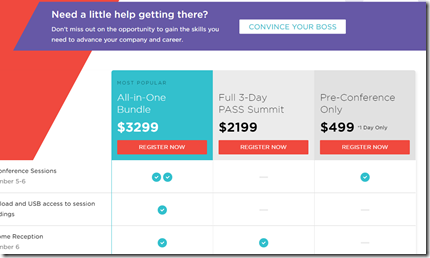
The bundle was a nice addition last year and continues this year.
Here are some of the sessions I look forward to on Wednesday:
David Klee’s On-Prem SQL Servers, Interstellar Performance
Lightning Talks: BI (Paul Turley, Reza Rad, Catherine Wihhelmsen and Chris Webb)
Reeves Smith – Follow Gartner’ Lead, Become a Citizen Data Scientist
I will follow up on the Thursday and Friday sessions in the next blog.
Monday, August 20, 2018
SQLSaturday Orlando–Power BI On-Premises In A Day
Please join me for a day of developing and deploying Power BI reports in an On-Premises environment. This event is a pre-conference session on the Friday before SQLSaturday #801 in Orlando, FL. This is their 12th SQLSaturday and should be a good one. Here is the schedule of the event on Saturday. Remember, the Saturday sessions are FREE!!!
As for the pre-conference Power BI event, there is a charge of $149. Please signup using this link.
Even though the deployed reports are going to be in SQL Server Power BI Reporting Services, there is still a lot of development in Power BI to assist anyone using the Desktop, Azure or On-Premises versions.
Wednesday, July 25, 2018
SQLServerCentral.com Stairway Series–SSAS Tabular
The first 2 articles have been published on a SQLServerCentral.com Stairway series for SQL Server Analysis Tabular models. This is truely a blessing to be able to publish on SQLServerCentral.com. I have been reading this site everyday since I started working in SQL Server 7.0. It has been my go to resource for informative articles.
The first article is Why Use Analysis Service Tabular? This explains what I have seen in the field about SSAS.
The second article is about installing the components for using SSAS Tabular.
The third will build a model from the Wide World Imports DW database.
Hope you enjoy and help me with the uses for Analysis Services Tabular Models.
Sunday, June 24, 2018
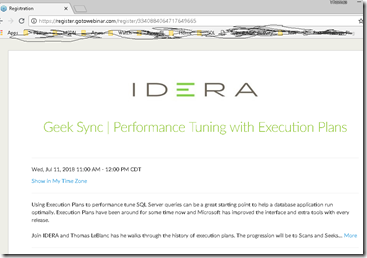
Idera Greek Sync: Performance Tuning with Execution Plans
On Wednesday July 11th, please join Idera Geek Sync at 11AM Central for a walk through some basics in Execution Plans. We will look at the history of execution plans and demonstrate how Microsoft has improved the tools to help DBAs find performance problems. The main body of the presentation will be about Loops as well as Scans and Lookups. The conclusion will include the Query Store and my favorite: Live Query Statistics.
The presentation will last about 45 minutes.
https://register.gotowebinar.com/register/3340884064717649665
Thursday, April 26, 2018
Wednesday, April 18, 2018
24 Hours of PASS – April 25th–26th
Well, it is that time of the year, again. PASS puts on a 24 Hours of PASS where 1 hours session go on once an hour for 24 hours. This is free training usually on a certain topic. The topic this time around is Cross Platform SQL Server Management.
The sessions are April 25th thru 26th, 2018. Register at this link.
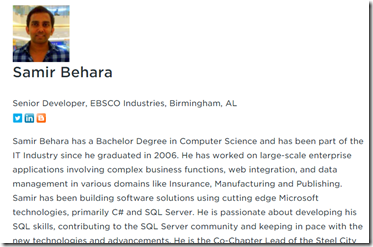
I am probably going to watch my friend Samir talk about SQL Cross-Platform Tools
Also, chek out the schedule and see what works for you.
Wednesday, April 11, 2018
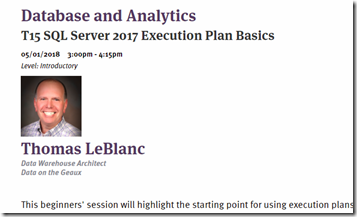
DBA Fundamentals–Tuesday 11 Central–Execution Plans
WHAT: EXECUTION PLANS FOR BEGINNERS
WHEN: Tuesday, 04/17/18 - 11:00 am – 12:00 pm
WHO: Thomas LeBlanc
WHERE: https://attendee.gotowebinar.com/register/7086336336602188044
This will be a Beginners session highlighting the starting point for using the execution plans from SQL Server to assist in query tuning. Briefly, we will look at the history to get an idea of how Microsoft has improved the display through Graphical Plans and Missing Index suggestion. The, we will answer questions like the following. What is the difference between a Table and Clustered Index Scan? What is a Lookup? How do you improve performance of Lookups? What are the different types of Loops? How to get more information from the Plan with the properties window?
Thomas LeBlanc (Thomas-LeBlanc.com) is a Microsoft Data Platform MVP and Data Warehouse Architect in Baton Rouge, LA. Today, he works with designing Dimensional Models in the financial area while using Integration (SSIS) and Analysis Services (SSAS) for development and SSRS & Power BI for reporting. Starting as a developer in COBOL while at LSU, he has been a developer, tester, project manager, team lead as well as a software trainer writing documentation for classes. Involvement in the SQL Server community includes speaking at SQLPASS.org Summits (2011-2017) and SQLSaturday since 2011 as well as a speaker at IT/Dev Connections (15,17) and Live! 360(2015-2017). He is the past Chair of the PASS Excel Business Intelligence and Data Architecture Virtual Chapters and worked on the Nomination Committee for PASS Board of Directors for 2016 & 2017. Bing TheSmilingDBA for more information about Thomas.
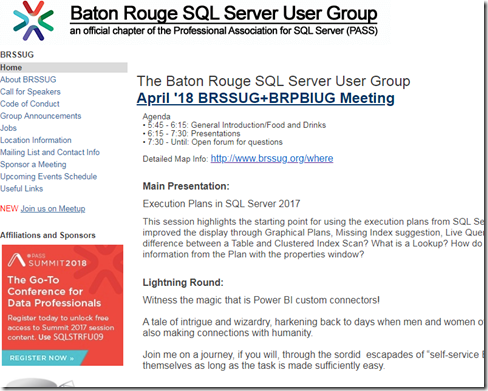
Baton Rouge SQL Server User Group – Execution Plans
Tonight, April 11th starting at 6PM, the Baton Rouge SQL Server User Group will hold its monthly meeting. The Baton Rouge .Net User Group does the same at the same place – La. Tech Park.
The 2 user groups have been holding meetings together for some time now.
I will be presenting ‘SQL Server Execution Plans’ and Andy Parkenson will be doing a lighting round on Power BI (Witness the magic that is Power BI custom connectors!)
Wednesday, February 28, 2018
PASS Summit 2018 – Call for Speakers
It is that time again. PASS has opened the Call for Speakers. I have submitted for the past 10 years, and have been selected the past 7 years. This was such an important milestone in my career to be selected and then to present. Making sure I know what I am talking about and present in a meaningful way has increased my understanding of SQL Server and other data platform tools.
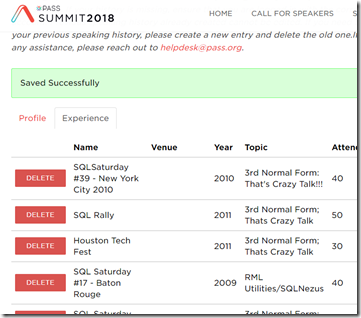
After you login, you have to fill out the profile of yourself. It really helps to list as much of the previous speaking you have done. This helps with I am sure the speaker ratings. Speaker ratings is one of the measures to be selected.
This is a time where I can review the speaking opportunities I took advantage of in the previous year.
It all started with the Database Normalization talk in 2010. Wow!!!
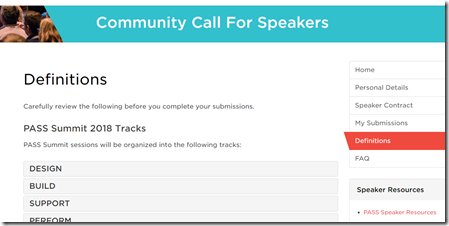
Please go through the definitions to understand the “rules” and sign the speaker agreement and get started.
It is time to Connect, Share and Learn!!!
Thursday, February 8, 2018
Speaking at PASS.org Summit
For the last 7 years, I have been speaking at the PASS Summit. This event is usually in Seattle, but one year it was in Denver (did not speak at this one) and one year Charlotte, NC. It is hard to explain everything that goes on during that week because there is too much to mention. It really depends on the intention of the attendee on what he/she wants to do during the week. You cannot do everything.
Help PASS continue to be a great conference by filling out a survey - Program Content survey.
For a speaker like me, I have to spend the majority of the time making sure I provide value for the session(s) I will be giving. In the mean time, I try to catch at least one of session each day, spend time in the community zone and network with other attendees. On Tuesday, I might be in the User Group, SQLSaturday or Virtual Chapter get together. At night, just pick something.
So, lets go through some of these items.
Attending other sessions
My first goal with attending others sessions is to learn something new or expand on a subject and bring this back to the office. I try to implement this within the first month. The second goal is to implement a different skill or best practice within the next 3 months. If I get that done (which happens occasionaly) then I can go to the 3rd lesson learned.
Community Zone
If you are not familar with this area of the Summit, just look for the bean bags. Here is usually where I find other people I have meet at a SQLSaturday, a local User Group or while hosting a Virtual Chapter or 24 Hours of PASS session. These opportunites to talk with other experts in the Microsoft Data Platform community give me contacts when I have questions.
Networking
This is real simple. I eat breakfast and lunch everyday at the convention center and just pick a random table and start conversations. There is not much effort to this because I have to eat. This is usually an hour twice a day to meet others. There is even a Birds of a Feather lunch for sitting at a table for a specific topic.
So, why am i talking about this stuff. Not to get you to attend, but for you to submit to speak at the PASS Summit. Please watch PASS.org and the newsletter for an annoucement about session submissions. If you want to send your abstract to me for review, I will be more than happy to help. Why? becuase a couple of speakers helped me in the beginning.
Thursday, February 1, 2018
VSLive 2018 Austin, TX
VSLive events are nice conferences to get a wide range of topics from .Net to mobile development to the data platform. It looks like they have added some Hands-on Labs on Friday in addtion to the Workshops on Monday. Regular sessions are Tuesday thru Thursday. The hotel is in downtown Austin, so it is easy to walk around before or after sessions.
The VSLive events are in Austin, Las Vegas, Boston, Redmond, Chicago, San Diego and then the big Live! 360 Event is in Orlando. I have spoken at Live! 360 the past 3 years, and looking forward to returning this year. The variety of sessions are great to slum around learning different topics. The code ATSPK15 can be used to get $400 off 4-day registration.
The Austin event is a new one for me. I have 2 session for developers: Power BI for Dev and Reading Execution Plans. I am really surprised at the number of attendees in the Execution Plan session. I did one similar at SQLSaturday Orlando and had 50-60 attendees.
Amplify your knowledge at Visual Studio Live! Austin — bring the issues that keep you up at night and prepare to leave this event with the answers, guidance and training you need. Register now: http://bit.ly/ATSPK15Reg
Thursday, November 30, 2017
Resources from the PASS community this coming month
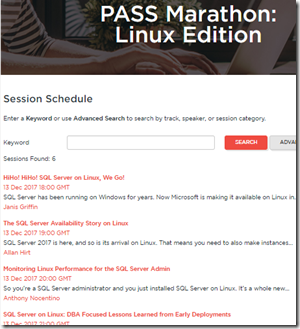
Even though it is December, I noticed a lot going on for FREE in the PASS Microsoft Data Technology community. The first interesting one is a PASS Marathon: Linux!!! Here is the link. Never thought I would see something like this related to PASS. But it is here, so take advantage of it.
As with all PASS marathons or 24 Hours of PASS events, they are recorded and you can watch later.
The other events center around SQLSaturday and Virtual Chapters.
SQLSaturday has events this coming month or 2 in Montevideo, Lima, Slovenia, Providence, Washington DC, Nepal, Malaysia and Nashville. SQLSaturday are free events on a Saturday (though I have seen one on Friday) and you can interact with speakers and attendees.
The Virtual Chapters are online and feature a wide ranges of topics like Azure Automation, Containers and Clones, SQL Server 2017 Deep Dive, etc. by speakers Taiob Ali, Paul Stanton and Bob Ward.
One of the slides in the decks for PASS Summit encourages attendees to get all you can from this community. Whether it is networking, learning or volunteering, there is always something to keep you busy in the world of Data with Microsoft technologies. Please jump in. I did!!!
Wednesday, October 25, 2017
IT Dev Connections 2017
The IT Dev Connections conference was in San Francisco, CA this week. While I did not spend any time as a tourist, I did mingle with attendees and speakers. It was nice to sit with Grant, Andrew, Mindy, Kevin, Tim, Monica, Daniel and Meagan for dinner Monday night.
I attended a workshop on Friday about Azure. The speaker, John Savill did a great job the first half and helped me understand some fundamentals about Azure Infrastructure but the second half got me lost with IPs and Express Connections. Some of the pricing was interesting and I am going to try the Analysis Service in Azure soon.
Breakfast and Lunch was nice talking with attendees and speakers. I met Bruce with HP and even bumped into Ben DeBow in the lobby.
Tuesday I spoke on Self Service BI with Power BI. It was well attended (45-50 in a 60 seat room). Not many questions during the presentation and a few at the end. I shortened the talk to 1 hour (from 75 minutes) because it usually gets rushed at the end because of questions during the session. That did not happened, so it ended early but no one complain. Lunch was next on the schedule.
I did attend Victor’s session on Business Case for using SQL on Linux, Anthony’s session on Networking Internals for SQL Professionals (really good, lots info an he explains a lot really quickly with good demos) and Meagan’s talk on Azure Data Factory. Victor’s was good and Meagan explain a lot. The Data Factory is interesting but it looks v2 would be the time to start using, not v1.
The last session I did was Deploying with SSIS 2016. Not as many attendees (~20) but a couple were nodding their heads frequently and only one sleeper. The sleeper actually asked more questions at the end, so maybe his eyes were just closed the whole time.
IT Dev Connections was at a really nice hotel by Union Square in San Fran, but I heard some talk about it being expensive. That was really the only complaint. Food was great and logistics cool being in the hotel for the rooms and conference. Not a lot of walking but enough to get some exercise.
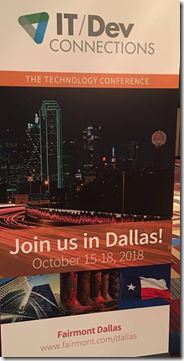
Looking forward to Dallas next year (Oct 15-18 maybe) – Rod Trent announced this on Monday night. He is really excited about IT Dev Connections and promotes well. It was nice to eat lunch with him and others on Monday and get scoop on the event.
Next week is the PASS Summit, so on to the next conference.
Thursday, September 28, 2017
SSAS Tabular DirectQuery–No Hierarchies in Dimensions
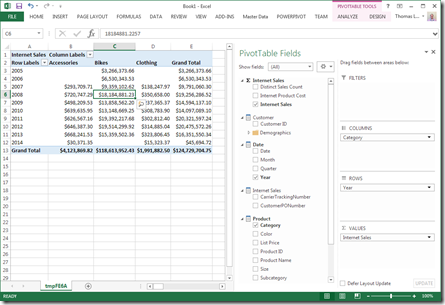
I recently was testing DirectQuery to see the reporting differences in a Tabular Model. After Deploying to a development server and analyzing in Excel, the hierarchies for the Date and Product dimension were not available. SQL Server 2016 SP1 was used in this example.
You can go to this like from Microsoft about more limitations.
There was also difference in labeling when designing a Tabular Model in Visual Studio (SQL Server Data Tools – SSDT) and making a change to the Model from SQL Server Management Studio – SSMS.
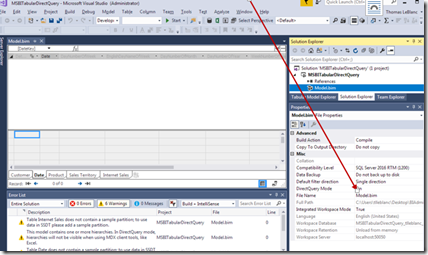
In SSDT, The Property for the Model is DirectQuery and the values are On and Off.
In SSMS, The Property is Default Model and the values are DirectQuery and Import.
Not sure which I like better. But, what you are able to do is Deploy a model built with DirectQuery Off (with hierarchies), then change the property in SSMS on the database, and see the changes. Or vice versa. If you are previewing the DirectQuery Off Mode in Excel before making the change, when the data is refreshed, the hierarchies are removed.
Tuesday, September 12, 2017
Elect The Next PASS Board Members
The PASS board elections are coming up and there is a twitter chat event to ask questions to the candidates before you vote. Both tweeter events will be on Tuesday September 19th at noon central and 3PM central. The hashtag will be #PASSelections, so join the conversation and ask questions in order to get a better idea of the candidates.
The voting begins on Wednesday September 20th (the next day) and you will be able to go to PASS.org to watch campaign videos of each candidate. They will answer about 4 questions (the same 4 questions) in a short video.
These changes to the campaign were asked to happen by the community, so if you have more comments about the campaign process, email PASS. Check your email this week for more information about the elections and where to find additional stuff on the candidates.
Remember, these members are volunteers in the SQL Community (or the Microsoft Data Technology community) that want the best for our wonderful network of professionals.
Wednesday, August 16, 2017
Analysis Services Series on SQLShack
Please visit SQLShack.com for new articles on many facets of SQL Server. I have been trying my best to document how to create SQL Server Analysis Service databases with Multidimensional Cubes as well as Tabular Models.
The start was a Best Practices article for Dimensional Modeling and other items that help with a smooth transition to creating an SSAS database. Here is a link to that article.
The flow of the articles starts with the multidimensional cube, then the next article shows tabular.
After the best practices, I move to connecting to a data source, then creating attributes and measures.
Even though people are using Power BI more than Analysis Services, eventually when their systems get to large, they are going to have to find an enterprise solution for modeling the data. I do not believe that modeling in Power BI is very sustainable.
With the Microsoft push for Cloud First development, Analysis Services in Azure will be the next big item. If you have not already seen, you can import a Power BI Model into Azure Analyssi Services. Tabluar is in Power BI not Multidimensional Cubes. So, you better start learning tabular and maybe start new projects in Tabular Model Analysis Services.