Monday, October 19, 2015

PASS Summit 2015

Yes, it is that time of the year again. You know, when all the nut case and normal SQL Server experts collide in Seattle (or wherever the Summit is located) to experience the largest gathering of data experts on this planet. Well, I might be lying a little about the personalities of these people (including myself), but I am getting excited about next week.

PASS Summit 2015

I just tried to build my schedule of sessions to attend and had the same problem. 3 to 4 sessions that I want to see but only have time for one. Good thing these are recorded and I can watch after the event.

image

That is not the only problem. I have to find time to visit vendors, talk to attendees I know and have not meet yet and give a 3 hours session on Tabular plus the after hour events. This is an exhausting week, but has paid dividends 10 fold from attending 8 of the last 9 years.

image

If you have not attended this event and have the budget to do it, please do not pass up. You can read many blogs and articles about the benefits of membership to PASS plus sessions to learn about SQL Server and the Microsoft Data Platform roadmap.

Hope to see ya there and please come say hi to me!!!

Thursday, September 17, 2015

#ITDevCon15 Conner Cunningham Keynote

On Wednesday morning, Conner Cunningham from Microsoft was the keynote speaker for IT/DevConnections in Las Vegas. His talk focused on SQL Server 2016. To summarize the things he said that got my attention were a Live Query Plan, the Query Store to retrieve a previous query plan and Azure Dev First – then on-premise. Continue reading if you want more information.

The talk concentrated on SQL Server 2016. His favorite parts are making queries run faster because this is the area he helped in planning and development years ago. Now, he encourages the developers and architects to make queries run faster. DBAs love this stuff.

The talked started with an overview of the new features in releases 7.0 to 2014. It was good to see the progress in SQL Server from the early days to today.

Conner said SQL Server 2016 is a very, very big release – more announcements will come at PASS Summit 2015 at the end of October in Seattle.

The data engine is now 3 to 4 different actual engines in different development streams but using the same skill set for the DBA. The rise of cloud computing has shifted to development in Azure first, then using the same code base to release on-premise.

The development can be done faster now due to changes in the process at Microsoft and release and testing is easier because of the cloud. This gets feedback to the development team faster and updates to problems released sooner. What used to take 3-5 years, now is done in months.

Microsoft only vendor where on premise and cloud are fully supported on same code base!!!

Here is a list of new 2016 features

Security

  1. Row level permissions to limit rows returned (select statement returns only the rows the user has permission to see.)
  2. TQE – Transparent Queryable Encrypt (better protection)
  3. Data Mask columns (x’s in a SSN)

AlwaysOn Improvements

  1. Log transport improvements
  2. DB level failover rather than instance
  3. Load balance readable secondary
  4. ActiveDirectory integration
  5. DTC transaction support  (this was a big one)
  6. 2 failover targets

Language enhancements

  1. JSON support 
  2. Temporal table support – Historical tracking of changes automatically, Think Audit Tables

In-Memory Engine – OLTP (2014)

  1. 5-20 times faster
  2. Collation support, JOINs, Large DBs, MARS support, Initial UDF/TDF support and row level security

Column store enhancements

  1. Updateable non-cluster column store indexes
  2. Non-clustered B-tree indexes
  3. Always On support – readable secondary support

Polybase

  1. Query relational and non-relational data with T-SQL
  2. Hadoop support

Column store scales better with Degrees of Parallelism

  1. Batch mode scales far better

Stretch SQL Server in Azure

  1. For data you do not want to delete but need at some point
  2. Increases backup time where the warm data is backed up and cold data is in cloud (which has HA and backups/restores)
  3. For historical data

Upgrade

  1. Rewriting upgrade guide (was 429 pages)

Improved Upgrade advisor

  1. Try the tool

Eliminate Trace flags for High-End Scaling

  1. Most have been integrated in 2016

Optimizer Changes Now Tied to DB Compatibility Level

  1. Less risk for upgrades
  2. Trace Flag 4199 folded in new DB compatibility Level

Query Store

  1. Force prior plan
  2. Deep insight into workload performance
  3. Simplifies upgrades by reducing change risk

Conner says he has been working on Query Store for a long time and is extremely happy about this has finally been done

Monday, September 7, 2015

Dustin Ryan: Power Pivot 101: An Introduction

The PASS Excel Business Intelligence virtual chapter presents Dustin Ryan introducing everybody to Power Pivot in Excel. This chapter has gotten a lot of questions during some of the last couple of sessions that can be directly done in Power Pivot through Excel.

Please join us this Thursday September 10th at Noon Central time for our monthly Excel BI VC meeting. Below is more information:

Thu, Sep 10 2015 12:00 Central Daylight Time


Excel BI VC presents Dustin Ryan - Power Pivot 101: An Introduction

RSVP:https://attendee.gotowebinar.com/register/4390709838901462786

POWER PIVOT 101: AN INTRODUCTION

Power Pivot is a powerful yet flexible analytics tool built into a familiar environment yet many users remain unsure of how to take advantage of this dynamic tool. In this session, learn the purpose of Power Pivot, where Power Pivot fits within your organization and the basics of designing a Power Pivot model that integrates disparate data sources with the goal of gaining previously unrecognized insight into key business metrics.


Dustin Ryan is a senior BI consultant and trainer with Pragmatic Works in Jacksonville, FL. Dustin specializes in delivering quality enterprise-level business intelligence solutions to clients using SSRS, SSIS, SSAS, SharePoint, and Power BI. Dustin has authored and contributed to SQL Server books. You can find Dustin speaking at events such as SQLSaturday, Code Camp, and online webinars.

Tuesday, August 11, 2015

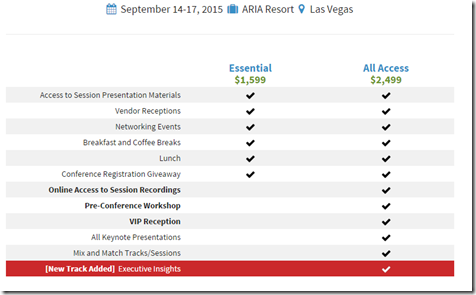
DevConnections Sept 14-17th 2015 – Las Vegas

DevConnections is a new conference for me and I am excited about the opportunity to present 2 different sessions. The conference is at ARIA Resort in Las Vegas, NV. There are many great speakers at this event including Grant Fritchey, Itzik Ben-Gan, Denny Cherry and many more. The conference includes more than one technology.

Here is a Promo Code LSPK49 for a savings of $600 off the standard price of $2,250 for the 5-day all-access package!

SessionTracks

The cost of the event includes access to all sessions from all tracks. I would really like to spend some time in the Cloud & Data Center as well as Enterprise Collaboration. The first day (Monday) is for full day workshops in all tracks.

Registration

I will be speaking on Tuesday at 11AM and Wednesday at 1:15PM. The sessions are Attributes and Hierarchies in SSAS 2014 and Excel 2013 Tips and Ticks for Displaying a Multidimensional Cube. These are topics that I really have a passion to work on. Analysis Services is a great tool for aggregating data and being able to get Dimension columns into Hierarchies and Members. With Excel, you can directly report against a cube and get lots of insights.

ThomasSessions

There is also a SQLSaturday on the weekend before this conference, so if you are in Las Vegas, you will probably get to see some if these same speakers on Saturday (for free).

Monday, July 27, 2015

SQLSaturday #423 Baton Rouge

This is I believe the 7th SQLSaturday in Baton Rouge. Please come out this Saturday at the LSU Business Center to enjoy free training, prizes and networking with over 500 IT professionals.

sqlsat423 

Here is the schedule.

Friday, July 24, 2015

Power Bi Desktop Release Today

You can download the much hyped up Power BI Desktop (formerly Power BI Designer). There are many blogs about the new features, but I am going to mention one here that I have been waiting for.

It involves connecting to the Analysis Service database as a connection and not an import all the tables into the Power BI file.

Once Power BI Desktop is Open…

image Click on Get Data…

image  then highlight SQL Server Analysis Services Database

Click Connect…

image 

Now, you have a new option

- Explore the Tabular model by using a live connection

You no longer have to use the option to retrieve the data into the Power BI file.

Once you click OK after entering the instance name…

image

You now can Navigate to the SSAS Database and select the Model or Perspective to connect to. Once selected, click OK

image

Now, you can start building the visualization like PowerView connected to a tabular database.

image

Thursday, July 16, 2015

New Features of SQL Server 2016

The next version of SQL Server looks to add more and more features helpful in database design and administration as well as Business Intelligence.

The first I found interesting is Temporal Tables. This table keeps a history of the changes made to the table over time. This will change how software developed to track changes will be coded in the future. How wonderful it would be not to have to worry about this. Another plus side to all these changes is more and more DBAs will be needed :)

The next feature is Stretch Database. This option lets you use Azure to store and retrieve archival data in the cloud. I was not much of a fan of the cloud in the beginning, but now I see benefits as the technology advances to make it easier to manage.

In-Memory technology as well as Column Store indexes seemed to be the big items for performance improvements. Check here and here for those updates. If you are really interested in reading about Column-store indexes, check out NikoPort’s blog.

Of course, I will have to mention something about SSIS. Incremental Package Deployment is the one that interest me most. Not having to deploy the whole project will help with the manageability of versions on the production server. It was great when SSISDB was released in 2012, and it looks like Microsoft is going to keep improving this option.

Performance improvements to the tabular model of Analysis Services seems to be the direction Microsoft is heading as far as SSAS improvements are concerned. The parallel Processing of Partitions will make it more in line with the advanced features of Multidimensional Cube. I still believe Multidimensional Cube is needed for Enterprise level cubes, but tabular is catching up.

New DBCC commands are added to check for corruptions in Analysis Services database (both Multidimensional Cubes and Tabular Models) as well as new DAX functions for Tabular. Read here for the full list for Analysis Services.

Of course, all of this is in the current CPT release and can change so get updated will the latest.